Vehicle Map View
See every vehicle on the game map — color-coded by squad, filtered, and manageable in one click.
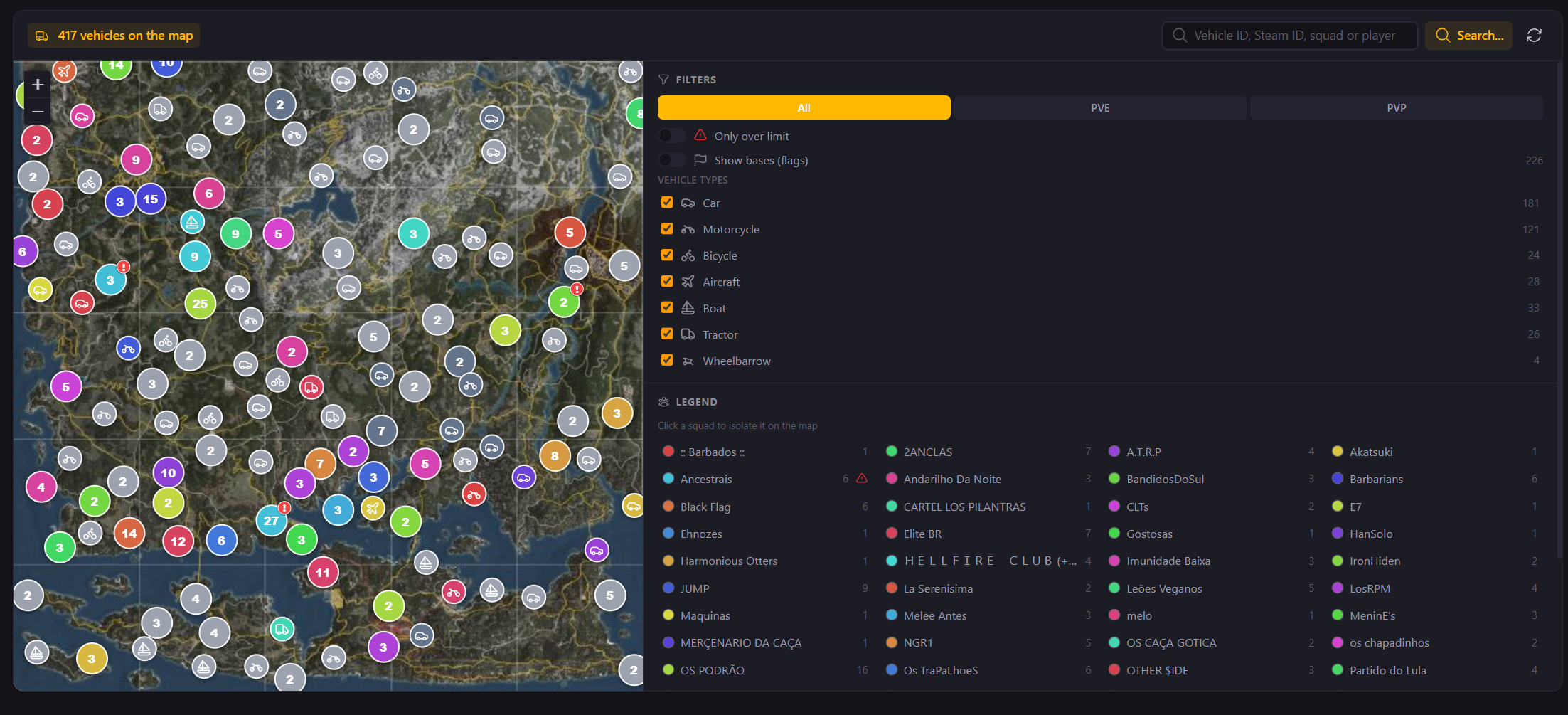
Vehicle Map View adds an interactive map to the Vehicles menu, so you can switch from the table to a full map of every vehicle on your server. Vehicles are color-coded by squad and shown with an icon for their type, while any vehicle over the allowed limit is clearly highlighted and squad bases appear in each squad's color. Filter by squad, type, or PvE/PvP, search for a specific vehicle, and click any of them to copy its coordinates, copy its ID, copy a teleport command, or delete it — right from the map.
Key Highlights
- Vehicles on the Map — Switch the Vehicles menu from table to a full map of every vehicle on your server
- Color-Coded by Squad — Each vehicle is colored by its squad and shown with an icon for its type (car, plane, boat, motorcycle, and more)
- Over-Limit Highlights — Vehicles above the allowed limit are clearly highlighted, with squad bases shown in each squad's color
- Smart Filters & Search — Filter by squad, vehicle type, PvE/PvP, or only over-limit vehicles, and search to jump straight to one
- Manage From the Map — Click any vehicle to copy its coordinates, copy its ID, copy a teleport command, or delete it
Related Features
Alert System
Give your players a real security advantage with personalized base protection alerts delivered straight to their DMs.
Raid Monitoring
Keep your community informed about raids with real-time monitoring, locations, and statistics.
Interactive Map
Visualize players, vehicles, and flags on a real-time interactive map directly from the admin panel